


Download InstaBro Content Browser – Free Instagram Feed Viewer & Social Media Tool
InstaBro Content Browser is a lightweight, free application designed for anyone who wants to browse Instagram feeds without the clutter of the official app or a web browser. By offering a streamlined, top‑down view of public and private Instagram accounts, InstaBro lets you scroll through photos, read comments, like posts, and even export images as CSV files for analysis or archiving. The tool works on Windows, macOS, Android, and iOS, making it a versatile companion for creators, marketers, and casual users alike. Whether you need a quick glance at a friend’s story, a way to monitor competitor hashtags, or a secure environment to manage multiple Instagram profiles, InstaBro delivers a smooth, ad‑free experience that respects your privacy—no login is required for public accounts, and secure authentication is optional for private feeds. This review explores the core features, installation steps, system compatibility, and real‑world pros and cons to help you decide if InstaBro should become your go‑to Instagram browsing solution.
Key Features That Set InstaBro Apart
- Login‑free public browsing: Access any public Instagram profile without entering credentials.
- Secure private‑account access: Optional encrypted login for private feeds, with two‑factor support.
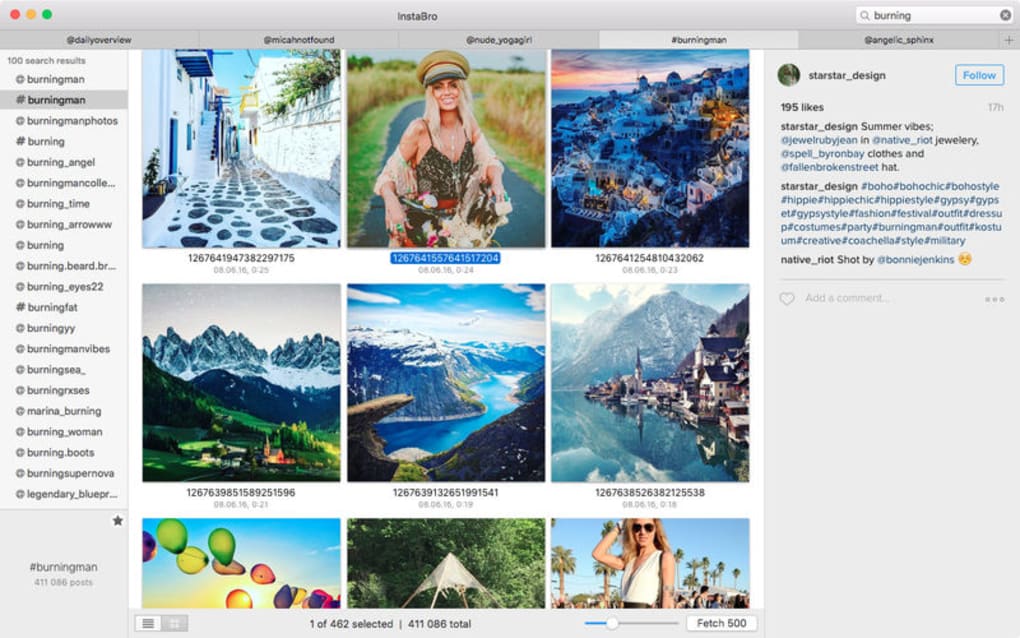
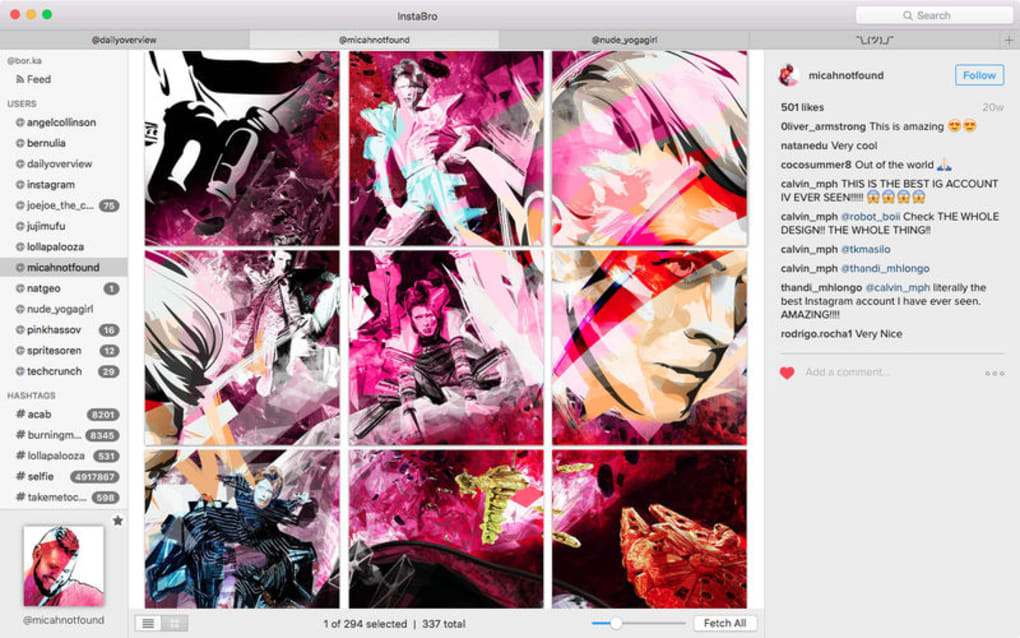
- Instant preview panel: A compact sidebar shows the most recent posts, likes, and comments at a glance.
- CSV export: Save image URLs, captions, timestamps, and engagement metrics as CSV files for easy reporting.
- Like and comment directly: Interact with posts from within the app, preserving the native Instagram experience.
- Table and collection views: Switch between a grid of thumbnails or a tabular list for data‑driven analysis.
- Tag and hashtag tracking: Follow specific hashtags and see related posts in real time.
- Cross‑platform sync: Settings and saved feeds sync across Windows, macOS, Android, and iOS via cloud.
- Lightweight design: Under 80 MB on desktop, under 30 MB on mobile, ensuring fast start‑up and low memory usage.
- Automatic updates: Background update checks keep the app current with Instagram’s API changes.
The feature set of InstaBro is crafted for both casual browsers and power users. Public browsing without a login eliminates the friction of credential management, while the optional secure login respects the privacy of private accounts. The preview panel is a game‑changer for marketers who need to monitor competitor activity quickly; it surfaces the most recent uploads, top comments, and engagement numbers without navigating away from the main feed. Exporting data as CSV makes InstaBro a valuable research tool—social media analysts can import the file into Excel, Google Sheets, or a BI platform to spot trends or compile reports. Additionally, the dual view mode (grid vs. table) lets you switch between a visual experience and a data‑centric layout, something rarely seen in free Instagram clients.
Instagram’s API restrictions often limit third‑party tools, but InstaBro stays compliant by using only publicly available endpoints for unauthenticated browsing and employing OAuth‑based authentication for private accounts. This approach ensures that your credentials are never stored locally; they are encrypted and transmitted securely. The built‑in two‑factor authentication adds another layer of protection, making InstaBro a trustworthy option for users who are cautious about third‑party access. Finally, the automatic update system reduces the risk of sudden breakage when Instagram changes its API, delivering a more stable experience over time.
Installation, Setup, and Everyday Usage
Desktop (Windows & macOS)
Downloading InstaBro for Windows or macOS is straightforward. Visit the official website, click the “Download for Windows” or “Download for macOS” button, and the installer will begin automatically. For Windows, the installer is a standard .exe package; for macOS, you’ll receive a signed .dmg. Run the installer, accept the license agreement, and follow the on‑screen prompts. The installation typically completes in under two minutes, even on modest hardware.
Once installed, launch the app from your desktop or start menu. The first screen offers two options: “Browse Public Feeds” or “Log In to Private Account.” Selecting the public option opens a search bar where you can type a username or hashtag. Results appear instantly, with the preview panel on the right showing the latest three posts. To like or comment, simply hover over a photo and click the heart or speech‑bubble icon; a small overlay will prompt you for a comment if desired.
Mobile (Android & iOS)
Mobile users can obtain InstaBro from the Google Play Store or Apple App Store. Search for “InstaBro Content Browser,” tap “Install,” and wait for the app to download (under 30 MB). After installation, open the app and grant permission to access storage (required for CSV export) and optional camera access (if you want to upload directly from the app). The mobile interface mirrors the desktop experience but is optimized for touch: swipe left/right to navigate between posts, pinch to zoom images, and tap the three‑dot menu for additional actions such as “Export to CSV” or “Add to Favorites.”
For private accounts, tap the “Log In” button, enter your Instagram credentials, and complete any two‑factor challenge. InstaBro stores the encrypted token locally; you won’t need to log in again unless you clear the app’s data. The app also supports biometric authentication (Face ID, Touch ID, or fingerprint) on compatible devices, providing quick and secure access.
Everyday Workflow Tips
- Save favorite feeds: Click the star icon on any profile to add it to your “Favorites” list for one‑click access later.
- Batch export: Select multiple posts in table view, then click “Export Selected” to generate a single CSV file containing all metadata.
- Custom tags: Use the “Tag Manager” to create your own hashtags and filter feeds by those tags.
- Sync settings: Enable “Cloud Sync” in the Settings menu to keep your favorites, tags, and export preferences consistent across devices.
- Stay updated: Turn on “Automatic Updates” to receive new features and security patches without manual downloads.
Overall, the installation process is frictionless, and the UI is intuitive enough that most users can start browsing within minutes. Whether you’re on a desktop for deep analysis or on a mobile device for quick checks, InstaBro’s consistent design language makes the transition seamless.
Compatibility, Pros & Cons, and Frequently Asked Questions
InstaBro is built on the Electron framework for desktop and native SDKs for mobile, guaranteeing broad compatibility. It runs on Windows 10 and later, macOS 10.14 (Mojave) and newer, Android 8.0 (Oreo) and later, and iOS 13 and later. Minimum system requirements include 2 GB RAM, 100 MB free disk space, and a stable internet connection for API calls. The app is fully 64‑bit on all platforms, ensuring optimal performance on modern hardware.
Pros
- Free to use with no hidden ads.
- No login required for public accounts, preserving privacy.
- Secure OAuth login for private feeds with optional 2FA.
- CSV export functionality for data‑driven workflows.
- Lightweight and fast start‑up across all platforms.
- Cross‑platform sync keeps settings consistent.
- Regular automatic updates keep the app functional.
Cons
- Limited to Instagram; does not integrate other social networks.
- Advanced analytics (e.g., follower growth charts) are unavailable in the free version.
- Exported CSV files contain URLs only; images must be downloaded separately.
- Occasional API rate‑limit warnings during heavy usage.
FAQ – Your Instagram Browsing Questions Answered
Do I need an Instagram account to use InstaBro?
No. Public profiles can be viewed without any login. If you want to access private accounts, you can securely log in using OAuth and two‑factor authentication.
Is InstaBro safe for my personal data?
Yes. The app never stores your password; it only keeps an encrypted access token locally. All communications use HTTPS, and optional biometric authentication adds an extra layer of protection.
Can I export photos directly from InstaBro?
InstaBro can export image URLs, captions, timestamps, and engagement metrics as CSV. To download the actual image files, you need to open the URLs or use a bulk downloader.
Why am I sometimes shown a rate‑limit warning?
Instagram imposes limits on how many requests can be made per hour from a single IP. If you browse many accounts quickly, InstaBro will pause requests temporarily and display a friendly warning.
Is there a paid version with more features?
Currently InstaBro is completely free. The developers have hinted at a future premium tier that may include advanced analytics and multi‑account dashboards, but no pricing has been announced yet.
Expert Review Summary
Overall Rating: 4.5/5
InstaBro Content Browser delivers a surprisingly powerful Instagram browsing experience without any cost. Its login‑free public view, secure private access, and CSV export set it apart from other free tools. While it lacks deep analytics and multi‑network support, the app’s speed, low resource footprint, and cross‑platform sync make it an excellent choice for casual users and social media analysts alike. The occasional rate‑limit notice is a minor inconvenience that reflects Instagram’s own restrictions rather than a flaw in the software.
Conclusion & Call to Action
If you’re looking for a secure, free way to explore Instagram feeds without the overhead of the official app, InstaBro Content Browser is a compelling solution. Its blend of privacy‑first design, powerful export capabilities, and seamless cross‑device experience makes it a standout tool in the crowded landscape of social‑media utilities. Download InstaBro today, add your favorite profiles, and start turning Instagram browsing into a productive, data‑rich activity.
Click here to download InstaBro Content Browser for free and enjoy a hassle‑free Instagram experience on Windows, macOS, Android, or iOS.







